Patreon Audio Download Not Working? MP3 Fixes (2026)
Find out why Patreon audio will not download, why a creator's link or the Chrome button is missing, and how to check an MP3, app cache, or private RSS feed.
If Patreon audio will not download, identify which download you are trying to use before changing settings. A creator's native audio link, the red button from Patreon Media Downloader, an offline item inside the Patreon app, and a private podcast RSS feed are different systems. Check post access, the audio type, and where the file should appear; an unavailable option does not necessarily mean your device is broken.
This guide gives you a practical diagnosis for each path, including what cannot be fixed with another extension or another retry.
Identify which audio download failed
Start by asking what you expected to receive. Did you want a portable MP3 in your Downloads folder, an episode for offline playback inside the Patreon app, or a podcast episode inside another listening app? A player that streams successfully does not prove that every saving method is available.
| What you see | Likely question | First place to check |
|---|---|---|
| No native Download option | Does the creator allow audio file links? | Audio post menu and creator guidance |
| No red Chrome button | Is this supported media on an accessible post? | Chrome extension and post type |
| MP3 is present but silent | Did the file finish and does the player support it? | Chrome downloads and local player |
| Episode missing in Patreon app | Was the item actually downloaded for offline use? | Library and automatic download settings |
| Episode missing from podcast app | Is it part of the creator's private podcast? | RSS subscription and membership |
Do not treat these as one generic error. The correct fix for a missing RSS episode is different from the fix for an incomplete MP3. It also matters whether you are looking at a video, an uploaded audio post, a shop product, or a separate file attachment.
When Patreon's own download link is missing
Patreon lets creators decide whether to show native download links on audio posts. Its audio download settings explanation says creators can turn these links on or off. A missing native link may therefore reflect the creator's choice, not a Chrome malfunction.
First open the post with the Patreon account that has the correct membership access. Check the post's audio menu and confirm it is an uploaded audio post rather than an external audio link. Patreon's audio sharing guide distinguishes uploaded audio from embedded players and attachments. Those categories can behave differently even when they appear on the same creator page.
If the native download action is absent, ask the creator whether they provide an authorized copy. Do not assume that changing browsers will override their setting. A separate Chrome extension is not the same thing as Patreon's own download control, and neither method grants permission to redistribute a file.
When the Chrome extension's red button is missing
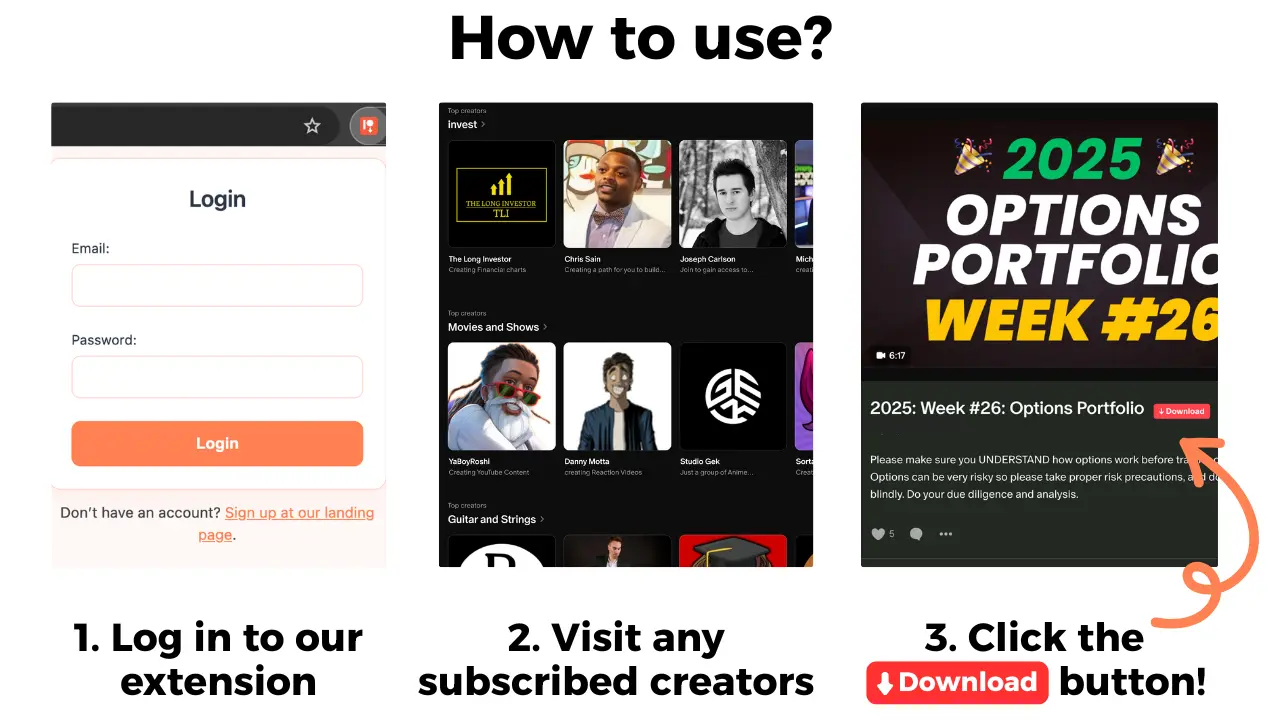
Patreon Media Downloader is a desktop Chrome extension. Its documented workflow is to open a Patreon post you can already access and use the red download button for supported video or audio. Audio is saved as MP3 for 3 credits per file. The extension does not unlock locked posts and does not download images, file attachments, shop products, or embedded YouTube videos.
Confirm that you are using Chrome on a computer rather than expecting the extension to run inside a mobile browser. Open the post while signed into the account that has access, check that the extension is installed and enabled, then reload the post. Look at the actual media: an external player or a file attachment is not equivalent to a supported Patreon audio post.
If the post is accessible and the button still does not appear, record the post type and what you see before seeking support. Do not repeatedly purchase credits to troubleshoot an unsupported item. For the broader installation and supported formats, see the Patreon downloader guide. For video-specific symptoms, use the video download troubleshooting guide.
When the MP3 downloaded but will not play
A completed download and a playable file are separate checks. Open Chrome's Downloads list, locate the actual MP3, and confirm it finished saving. If the file is missing, check the download destination and whether the browser showed an interruption. A filename in the list alone does not guarantee that the full file reached your device. For the exact Chrome folder and a safe way to organize saved audio, see the Patreon download location guide.
If the file exists, open it with a compatible local audio player. Check whether its duration looks reasonable, whether your device volume is muted, and whether another known MP3 plays in that player. These checks help distinguish a playback problem from a missing or incomplete download without assuming that Patreon is responsible.
Do not rename a non-audio file to .mp3 and expect that to convert it. Likewise, an MP3 file is not the same as a video MP4. If you need to move a confirmed file to a phone, follow the phone transfer guide and test it with airplane mode enabled. Keep the original file until the transferred copy works.
The product facts do not establish whether a failed attempt costs credits or qualifies for a refund. If your balance is affected, check the account's recorded activity and contact support rather than retrying blindly. For reference, the 7-day trial includes 15 free credits; after it, the Standard plan applies unless cancelled.
When offline audio disappears from the app or RSS
Patreon's own mobile app offers offline listening, but an episode saved inside the app is not necessarily a portable MP3 in your phone's Files folder. Patreon's current mobile audio instructions describe the Library and settings for automatic downloads and deleting finished downloads. Check those settings and verify the episode actually plays without internet access.
A private RSS feed is another system. It is available only when the creator enables the relevant podcast feature and includes the episode. If an episode is missing from your podcast app, confirm the feed belongs to your current membership, refresh the app, and check whether the creator added that post to the podcast. Do not share your private feed link or paste it into unknown downloader sites.
A saved bookmark, a streamed episode, and a cached podcast entry may all look similar in a list. Only a successful offline playback test shows that the content you need is present. The podcast offline options guide compares the official app, private RSS, and a permitted MP3 in detail.
A six-step diagnosis without wasted retries
- Sign into Patreon and open the specific audio post. If it is locked, resolve membership access first; a downloader cannot grant access.
- Decide whether you need a native download link, a desktop Chrome MP3, an in-app offline episode, or an RSS episode. Write down which path failed.
- Inspect the media type. Uploaded audio, embedded external audio, shop products, and attachments are not interchangeable.
- For a supported accessible post in desktop Chrome, verify the extension is enabled and reload once. For native links, check the creator's audio download policy.
- Look for the completed MP3 in Chrome downloads, or for a genuinely downloaded episode in the mobile app's Library or podcast app.
- Test the local file or episode with internet disabled. If the same issue remains, keep a note of the exact symptom and seek the relevant creator, Patreon, or extension support.
| Your goal | Best first option | Important limitation |
|---|---|---|
| Listen offline inside Patreon | Official app download | Does not promise a portable MP3 |
| Save supported audio as a file | Red Chrome extension button | Accessible audio post only; 3 credits |
| Listen through a podcast app | Creator-enabled private RSS | Not every post is a podcast episode |
| Obtain an unsupported attachment | Ask the creator for an authorized file | The extension does not save attachments |
Do not confuse a successful membership payment with a guarantee that every post format can be exported. If you are nearing the end of a membership, the access-before-canceling checklist explains why you should confirm timing and permissions first. Permission to view or save a personal copy does not automatically permit public sharing.
The short version
First identify the download path, then check access, media type, and the actual destination of the file. Use Patreon's app or creator-enabled RSS for supported offline listening, or the Chrome extension for a permitted MP3 from an accessible supported audio post. If a button is absent because the media is unsupported or the creator has restricted native links, repeated retries will not change that limitation.