Save Patreon Posts Before Canceling: What You Can Keep (2026)
Before canceling Patreon, check when post access ends and which videos, audio, images, or podcast episodes you can save without bypassing creator permissions.
If you want to save Patreon posts before canceling a membership, check your access end date first. Some memberships keep paid-post access until the next billing date, while other billing models can end it as soon as you cancel. While you still have access, you can save supported video and audio for permitted personal use, but no tool can guarantee that every post or benefit remains available afterward. Find the original lesson first with the old Patreon posts search guide.
The practical goal is to identify your deadline, separate downloadable media from unsupported content, and avoid assuming that a subscription grants permanent rights to a creator's work.
Find out when your Patreon access ends
Do not start by downloading everything in a hurry. Start with Settings → Memberships on Patreon, open the creator's membership details, and compare the next billing date with your billing history. Patreon distinguishes several billing models, and the difference determines how much time you have.
| Billing model | Typical access after cancellation | What to check |
|---|---|---|
| Subscription billing | Until the next billing date | Your membership renewal date |
| Monthly charge upfront | Until the next first day of the month | The paid month in billing history |
| Annual membership | Until the paid annual term ends | The annual renewal date |
| Monthly without an upfront charge | Access may end immediately | The creator's older billing arrangement |
| Per creation | Access may end immediately; pending charges can still be processed | Billing history and outstanding posts |
This distinction matters more than the day you press Cancel. A creator who charges on the first of the month is not necessarily using the same arrangement as a creator whose subscription renews on your join date. Patreon also warns that billing can be affected by time zones. If your access is important, review the details before the renewal boundary rather than relying on a last-minute guess.
For the platform's own rules, consult Patreon's explanation of what happens when you cancel and its current cancellation instructions. These pages describe the billing models and how to confirm cancellation. If your situation does not match the examples, contact Patreon or the creator rather than treating this table as a promise.
Decide what is actually possible to save
A Patreon post can contain video, audio, images, text, attachments, or media hosted elsewhere. The fact that you can view an item in a browser does not mean the same download method works for every type. Make a short list of the posts that matter and identify their actual media types.
| Content you can already access | Practical option | Important limit |
|---|---|---|
| Supported Patreon video post | Patreon Media Downloader saves MP4 | Five credits per video; no locked posts |
| Supported Patreon audio post | Patreon Media Downloader saves MP3 | Three credits per audio file |
| An image visible in your browser | Use the browser's Save Image As command | The extension does not download images |
| Creator podcast episode in a private RSS feed | Check your podcast app's offline controls | Feed access and offline retention vary |
| Embedded YouTube video | Ask the creator about a permitted option | The extension does not download embedded YouTube |
| Shop product or attached file | Follow the creator's own delivery instructions | Not supported by the extension |
The distinction between an ordinary audio post and a private podcast feed is especially important. Patreon says an RSS feed includes episodes that the creator has specifically added to a podcast, not every audio post, external player, or attachment. An RSS subscription is therefore not a reliable backup of an entire creator page.
If your goal is simply to understand the supported formats, the Patreon downloader guide explains the video and audio workflow. For a missing button or a file that does not play, use the video download troubleshooting checklist before retrying.
Save supported video and audio while you still have access
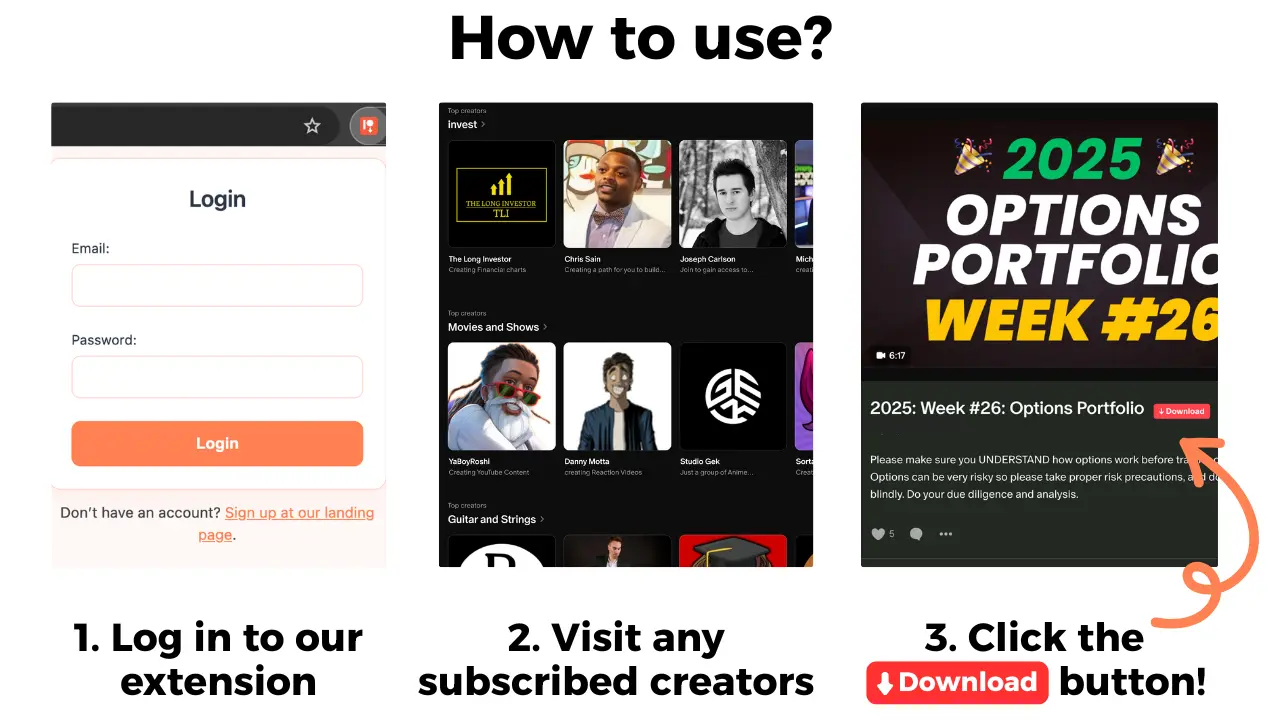
Patreon Media Downloader is a Chrome extension. It displays a red download button on supported Patreon posts that your account can already open. It is not an account archive, bulk exporter, or way around a creator's access restrictions. For a small number of posts, a deliberate one-by-one check is easier to verify than assuming a whole library has been saved.
- Confirm the post opens. Sign in to Patreon in Chrome using the membership that grants access. A locked post cannot be made accessible by the extension.
- Check the media. Look for a supported Patreon video or audio post, not a YouTube embed, shop item, image-only post, or attachment.
- Install or enable the extension. Use the official Chrome Web Store listing for Patreon Media Downloader. Reload the post if you need to check whether the red button appears.
- Save the supported file. Click the red button. Supported video is saved as MP4 at five credits per file; supported audio is saved as MP3 at three credits per file.
- Verify the result. Open Chrome's download history, confirm the transfer finished, and test the saved media in a compatible player before you leave the post.
- Keep a simple record. Note the creator, post title, date, and where you stored the file. This is a personal organization tip, not a feature of the extension.
The extension's seven-day trial includes fifteen credits, enough for up to three supported videos or five supported audio files. It does not require upfront payment, but the account changes to the Standard subscription after the trial unless canceled. Check the general downloader guide for plan details rather than assuming the trial is a permanent free service.
If your cancellation checklist includes many posts, review the bulk download and ZIP limitations before assuming all items can be saved in one operation.
Handle images, podcast feeds, and unsupported posts separately
For an image you are allowed to keep, open the image and use your browser's Save Image As command. Give it a meaningful filename so it does not get mixed up with unrelated downloads. This is a browser action, not an image-download capability of Patreon Media Downloader. If an image is part of a gallery, verify each one individually; do not assume a video download also captures pictures.
For a creator's podcast, check whether Patreon shows Listen in other podcast apps in your membership area. When the creator enables private RSS, Patreon lets eligible members copy a personal feed into a compatible podcast app. That feed is private and tied to your membership, so never share its link. Some podcast apps can store episodes for offline listening, but their settings and retention rules differ.
Patreon's audio RSS instructions explain that only designated podcast episodes appear in the feed. The creator may publish other audio or video posts outside it. When membership access ends, do not assume the feed will keep updating or that every app will preserve its cached episodes.
For an embedded YouTube player, a shop purchase, a file attachment, or a locked post, the extension is not the right method. Check the creator's instructions or ask for an authorized offline version. Avoid websites that claim to unlock someone else's paid content; such claims do not change your access rights.
Understand what a saved copy does not guarantee
A locally saved MP4 or MP3 is a file, not a continuation of your Patreon membership. It will not automatically restore comments, community access, private messages, future updates, or benefits that the creator delivers elsewhere. A screenshot of a post or a saved link likewise does not preserve the ability to open a paid page after access ends.
Permission also matters. Being able to see or download a creator's work is not the same as owning the copyright or receiving permission to redistribute it. Check the creator's membership terms before saving or sharing material, particularly if you plan to reuse it publicly. If the creator restricts copying, respect that restriction and ask for an alternative. Do not upload private RSS links or paid files to shared drives.
There is also a difference between canceling a Patreon membership and canceling the downloader's own subscription. They are separate services with separate billing. Ending one does not automatically end the other. Review both accounts independently if you use the extension's trial or paid plan.
A careful checklist for your last day of access
Before the deadline, revisit the few posts you genuinely need instead of treating every item as equally important. Confirm the post still opens, check whether the creator has supplied an official download or alternative access route, and only then use a supported method. This saves time and reduces repeated attempts on media the extension cannot handle.
Test each important MP4 or MP3 after saving it. A filename appearing in the Downloads folder does not prove a transfer completed correctly. Check that the file opens, the sound is present where expected, and you know which creator it came from. If something fails, follow the troubleshooting guide rather than making unsupported assumptions about credit refunds or file repair.
Finally, confirm the membership cancellation in Patreon's membership settings and retain your billing confirmation. If your billing model gives immediate loss of access, complete your permitted saves before canceling. If it gives access through the paid term, still verify the exact date rather than relying on a calendar reminder alone.
If the creator permits a personal copy for your phone, transfer the saved MP4 or MP3 and test it offline while you can still check the original post.
If you mainly follow a creator's podcast, compare app downloads, private RSS, and MP3 options before your membership access ends.
The short version
Check the membership's billing model and access deadline before canceling. Save only content you are allowed to keep: supported Patreon video as MP4, supported audio as MP3, and accessible images through your browser. Private podcast feeds, embedded media, attachments, and creator benefits have separate limits, so verify what you need before access ends.