Patreon Downloader: Save Video and Audio (2026)
How to download Patreon video and audio with a Chrome extension, what it costs, what it cannot save, and how it compares to other methods.
A Patreon downloader saves video or audio from a Patreon post you can already open, so you can watch or listen offline. The most direct option is a Chrome extension: install it, open the post, and click the red download button that appears on the page. Patreon Media Downloader does this for video (MP4, 5 credits per file) and audio (MP3, 3 credits per file), and it does not download images or file attachments.
This guide covers how the extension works, what it costs, where it fails, and how it compares to screen recording, browser tricks, and online downloader sites.
What a Patreon downloader actually does
Patreon plays media inside the page. A downloader reads the media the page has already loaded for your logged-in account and saves it as a normal file on your computer. That is the whole mechanism. It does not bypass payments, and it does not touch posts your account cannot open.
That distinction matters when you compare tools. Anything that claims to unlock locked posts is either broken or doing something you probably do not want on your machine.
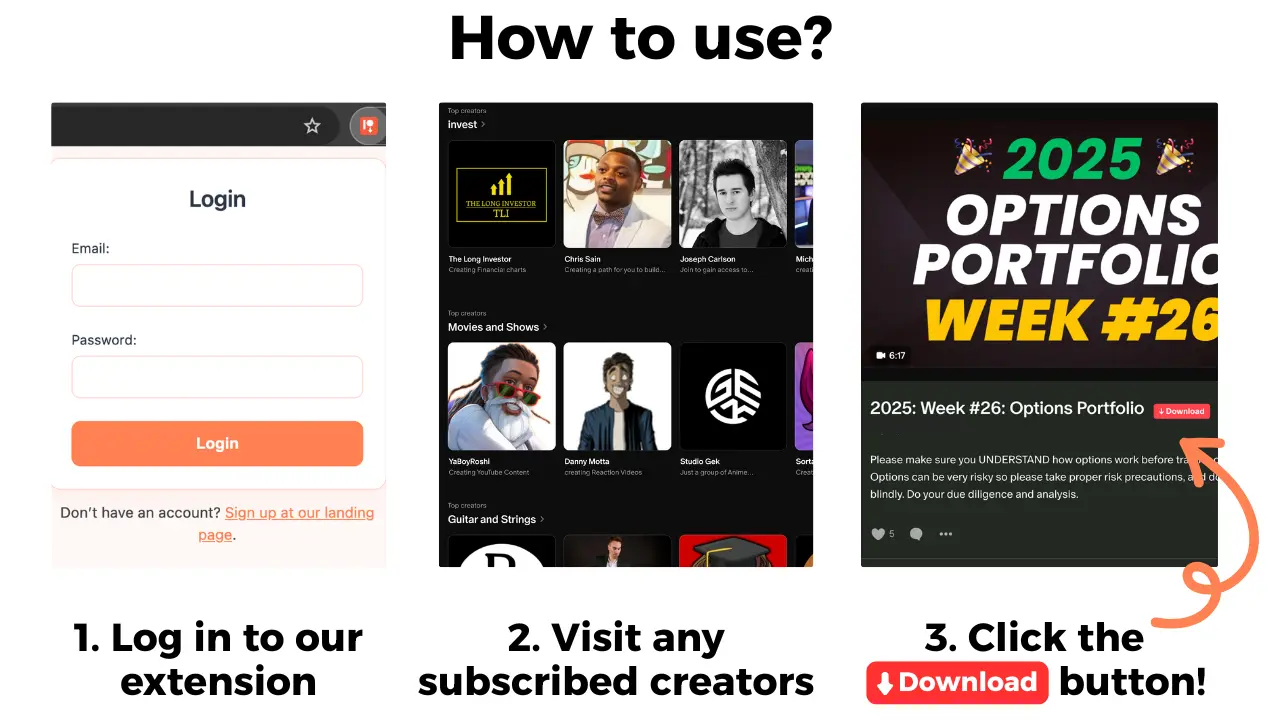
How to download Patreon video and audio with the extension
- Install Patreon Media Downloader from the Chrome Web Store.
- Open Patreon in the same Chrome profile and log in as usual.
- Navigate to the post with the video or audio you want.
- Click the red download button that appears on the post.
- Pick MP4 for video or MP3 for audio.
- Wait for the save to finish and check your downloads folder.
The button only shows on posts you can open, which is why you will not see it on locked tiers. If you are looking specifically for audio, the flow is identical; the file just comes out as MP3.
What it costs
The extension runs on credits. Video costs 5 credits, audio costs 3. The trial is 7 days with 15 free credits, enough for up to 3 videos or 5 audios, and no card is required upfront. After the trial the account becomes the Standard plan unless you cancel.
| Plan | Price | Credits per month | Roughly |
|---|---|---|---|
| Free trial | $0 for 7 days | 15 | 3 videos or 5 audios |
| Standard | $29.90/month | 100 | 20 videos or 33 audios |
| Pro | $39.90/month | 150 | 30 videos or 50 audios |
If you only need one or two files, the trial covers it. If you download a full back catalogue every month, do the arithmetic against how many posts you actually save before picking a plan.
Patreon downloader methods compared
| Method | Video | Audio | Images | Works offline | Main limit |
|---|---|---|---|---|---|
| Chrome extension | MP4 | MP3 | No | Yes | Paid after trial; no images or attachments |
| Screen recording | Yes | Yes (as video) | No | Yes | Real-time length, quality loss, manual trimming |
| Browser "Save video as" | Sometimes | No | No | Yes | Often saves a player page, not a file |
| Online downloader sites | Sometimes | Sometimes | No | Yes | Login walls, ads, unreliable on gated posts |
| Save Image As | No | No | Yes | Yes | One image at a time |
Where each method fails
The extension. It does not download images, Patreon shop products, or file attachments. Embedded YouTube videos often fail because of platform limits on the player. Posts you cannot open stay unavailable. If you need a photo, use your browser's Save Image As instead.
Screen recording. It works on anything visible, including embedded players, but a 40-minute video takes 40 minutes to capture. Audio recorded this way becomes a video file you then have to convert, and quality drops.
Online downloader sites. These ask you to paste a post URL. On patron-only posts the site usually cannot see the media because it is not logged in as you, so it fails or returns an error. Expect ads and pop-ups either way.
Browser save commands. Right-clicking a video rarely gives you a clean MP4. You often get an HTML page or a partial file that will not play.
Common problems and fixes
- No red button on the post. Check that you are logged in and that the post is one you can open. Locked posts and shop products will not show it.
- Download starts but the file will not play. Try a different player, and confirm the file finished saving rather than stopping partway.
- Audio post saves nothing. If the audio is an embedded third-party player rather than a Patreon-hosted file, it may be outside what the extension can reach.
- Button gone after an update. Reload the Patreon tab, or reinstall the extension from the Chrome Web Store.
Is a Patreon downloader allowed?
Downloading media for your own offline viewing is the common use case, and the extension only works on content your account can already access. That said, creators set their own terms, and redistributing paid posts is a different matter entirely. Keep downloads personal and check the creator's rules if you plan to share anything.
If you are planning to end your membership, check what to save before canceling Patreon while your post access is still active.
The short version
A Chrome extension is the fastest way to save Patreon video as MP4 and audio as MP3 from posts you can already open. The trial gives you 15 credits, enough for 3 videos or 5 audios, so you can test it on your own feed before paying. For images, shop products, and file attachments, use your browser's own save commands instead.