Patreon Video Download Not Working? Fixes and Limits
Patreon video download not working? Check post access, the red Chrome button, unsupported embeds, MP4 playback, and credit limits before retrying.
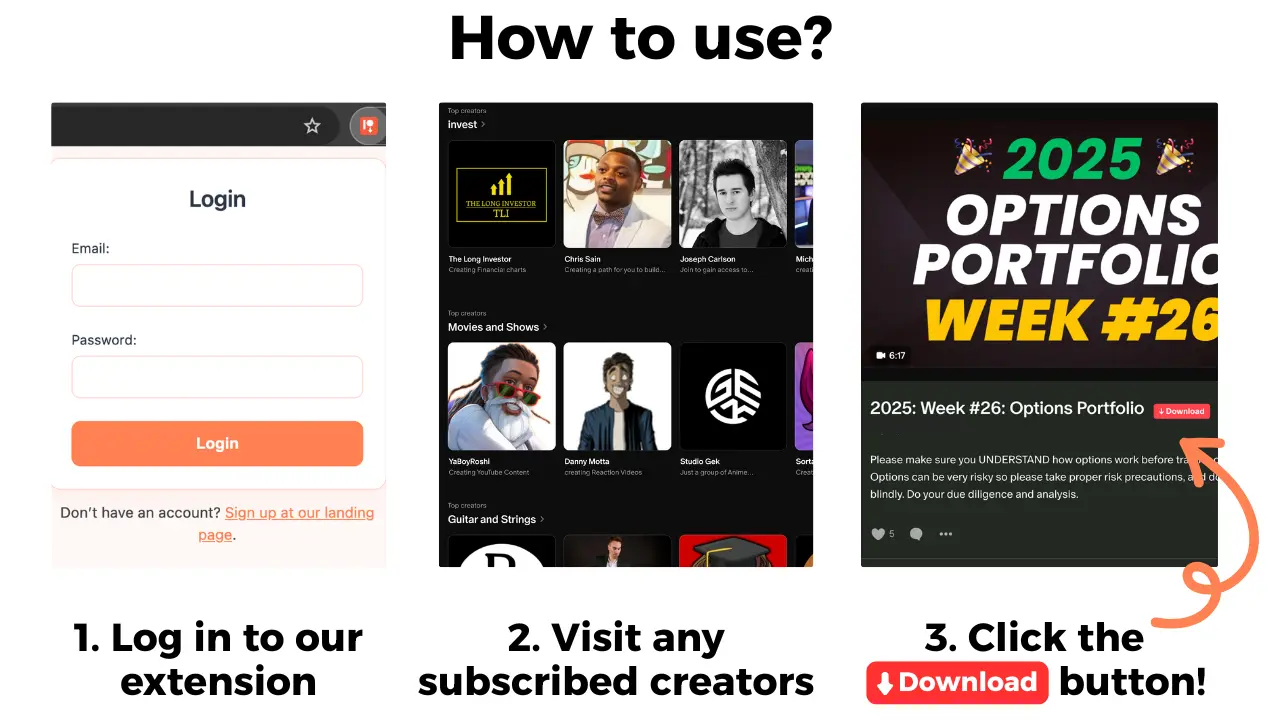
If a Patreon video download is not working, first check whether you can open the post and whether its player is an embedded YouTube video. Patreon Media Downloader is a Chrome extension with a red button on accessible posts. It saves supported video as MP4 for 5 credits, but it cannot unlock posts or download embedded YouTube videos.
If the problem concerns an audio post or an MP3 rather than a video, use the Patreon audio download troubleshooting guide for the correct checks.
Identify the actual problem
A missing red button, a locked post, and a file that will not play are different problems. Check which one you have before changing anything. If you cannot open the post in Patreon, the extension cannot give you access. If you can open it, inspect the media type and look for an embedded YouTube player. A player appearing on a Patreon page does not mean the extension supports it.
| Symptom | Check | Next action |
|---|---|---|
| Post locked | Patreon access | Obtain access through Patreon |
| Button missing | Media type and Chrome extension | Check for unsupported embed |
| MP4 not found | Chrome downloads | Check whether save finished |
| MP4 will not play | Local file and player | Confirm completion before retrying |
This diagnosis matters because repeated attempts do not solve a product limitation. Start with what you can verify directly in your browser.
Check Chrome and the red button
Open the Patreon post in Chrome using the account that can already access it. Confirm the extension is installed and enabled in your Chrome profile. Reload the post, then look for its red download button. These ordinary checks can help distinguish a browser setup issue from unsupported media, but they do not guarantee a button on every post.
If the post contains an image, shop product, or file attachment, do not expect the extension to download it. The extension cannot download images, locked posts, shop products, or file attachments. Embedded YouTube videos are also outside its supported downloads. The short version is that access and format must both be suitable before a download can work.
Check an MP4 that will not play
When a download appears to finish, open Chrome's downloads list and verify the file was actually saved. Find the MP4 and try a player that supports MP4. A file that has not completed saving may not play correctly. Avoid assuming the original Patreon video is broken just because one local player displays an error.
Compare what happens on the Patreon post with what happens to the saved file. If the original plays but the local copy does not, the issue may concern the saved file or local playback. If the original cannot play, a downloader cannot be assumed to be responsible. Keep a clear note of the symptom rather than repeatedly initiating new downloads.
The product facts do not specify how failed attempts are charged or refunded. Check your account information before retrying if credits are a concern.
If your downloaded MP4 plays on the computer but not on a television, use the guide to watching Patreon videos on TV to compare Chrome casting, AirPlay, and HDMI.
Follow a careful troubleshooting procedure
- Open the Patreon post with your own account in Chrome.
- Confirm you can already view the post.
- Check that the post contains video rather than an image or attachment.
- Identify whether the video is an embedded YouTube player.
- Check that Patreon Media Downloader is installed and enabled.
- Reload the post and look for the red button.
- If an MP4 was saved, check Chrome downloads and test the complete file.
Follow the steps in order. There is no value in changing Chrome settings for a post that is locked or an unsupported embedded player. For the broader process and formats, read the Patreon downloader guide. That guide covers ordinary use; this one is specifically about failed video downloads.
Compare alternatives and credit costs
| Option | Useful when | Limit |
|---|---|---|
| Chrome extension | Supported video on accessible post | MP4 costs 5 credits |
| Watch on Patreon | You can view but do not need a local file | Not a downloaded copy |
| Ask creator for a copy | An unsupported player is used | Creator decides availability |
| Screen recording | You have permission to record | Requires real-time capture |
The extension's 7-day trial includes 15 credits, equivalent to 3 videos or 5 audio files. Supported audio MP3 costs 3 credits. After the trial, the account becomes Standard unless cancelled. Standard is $29.90/month for 100 credits, equivalent to 20 videos or 33 audios, with its card stating then $0.90/download. Pro is $39.90/month for 150 credits, equivalent to 30 videos or 50 audios.
The extension subscription is separate from your Patreon membership. Paying for more extension credits does not unlock posts or change which embedded media can be downloaded.
If a post stops opening after you cancel a membership, review the Patreon access and saving checklist rather than assuming a browser error.
Limits and frequently asked questions
Why is the red button missing? The post may be locked or use unsupported media, including an embedded YouTube player. Check your access and media type first.
Can it save an embedded YouTube video? No. Embedded YouTube videos are outside the extension's supported downloads.
Can it download pictures or attachments? No. It does not download images, shop products, or file attachments.
Does a failed attempt cost credits? The stated product facts do not define failure charging or refunds. Check account details rather than assuming.
Use downloaded material in accordance with creator permissions. Being able to view a post does not automatically authorize redistribution. If the post remains unsupported after these checks, ask the creator about a permitted alternative rather than using a site that claims to unlock locked content.
If the MP4 plays on your computer but not on your phone, check the phone transfer and offline playback steps before starting another download.