Where Do Patreon Downloads Go in Chrome? Find MP4 and MP3 (2026)
Can't find a Patreon MP4 or MP3 saved in Chrome? Locate the file on Windows or Mac, choose a safe downloads folder, and organize creator media without losing access.
Patreon downloads saved through Chrome normally go to your computer's Downloads folder, unless you changed Chrome's download location or chose another destination when saving. The fastest way to find a missing MP4 or MP3 is to open Chrome's Downloads list, find the finished item, and use its folder shortcut. Downloads stored inside the Patreon mobile app are a different kind of offline item and may not appear as ordinary MP4 or MP3 files.
This guide shows how to locate a real download, distinguish it from an app cache or an unsupported file, and set up a tidy private collection without promising bulk export or access to locked posts.
Find the file Chrome actually saved
Start with the browser where the download happened, not a general search of your whole disk. In desktop Chrome, open the three-dot menu and choose Downloads, or use the browser's keyboard shortcut for its downloads page. Look for the file that finished downloading. A failed, cancelled, or interrupted item is not a complete local copy even when its name appears in the list.
Use the action to show the completed file in its folder. On Windows, the folder opens in File Explorer; on a Mac, it opens in Finder. If you changed Chrome's preferences, the destination could be somewhere other than the default Downloads folder. Google's official Chrome download help explains both the default locations and the setting that asks where to save each file.
Check the file itself before moving it. A video from a supported accessible Patreon post is saved by Patreon Media Downloader as MP4; supported audio is saved as MP3. If you find an HTML page, a shortcut, or a different kind of file, merely changing its extension will not turn it into a playable video or recording. For a format-specific explanation, see Patreon converter versus downloader.
The Chrome history entry tells you where the browser put the file. It does not prove the contents are valid. Open the MP4 or MP3 in a trusted local player, check that its duration is sensible, and test playback beyond the first few seconds. If it fails, use the video download troubleshooting checklist or the audio download troubleshooting checklist rather than repeatedly saving the same post.
Choose a download location that you can remember
Chrome lets you change its default save directory or ask for a location each time. Open Settings, find Downloads, and review the displayed folder. The precise labels can change between versions, so use Chrome's built-in settings search if needed. You can keep your normal Downloads directory and sort files later, or choose a private folder that you control.
If several people use the same computer, avoid a public desktop or shared family folder for member-only media. A private account folder is easier to search and less likely to expose creator content inadvertently. Chrome's save preference changes future browser downloads; it does not move files that were already saved in the old location.
Do not point Chrome toward a temporary directory that gets cleared regularly unless you intend to copy files elsewhere after every session. Likewise, a cloud-synced folder is not automatically a private or permanent archive. Check its sharing settings, available storage, and the creator's terms before copying paid material into a service outside your device.
Organize by creator, series, and date
A small naming system prevents the Downloads folder from becoming a mix of unrelated episodes. Create one top-level folder for authorized Patreon media. Inside it, use a creator folder, then a series or year-and-month folder where that improves retrieval. If a creator publishes both audio and video, keep their MP3 and MP4 files distinguishable.
For example, a directory like Patreon / Creator Name / 2026-11 / Episode 04.mp3 is easier to scan than a collection of files all called download (1). Choose a name that reflects what is visible in the post title; do not assume your downloader automatically records creator names, dates, episode numbers, cover images, or metadata. This folder structure is something you set up manually, not a feature claimed for the extension.
| File or location | What it means | Sensible next action |
|---|---|---|
| Completed MP4 in Chrome Downloads | A locally saved video file | Play it, then file it by creator |
| Completed MP3 in Chrome Downloads | A locally saved audio file | Check playback and name it clearly |
| Offline item inside the Patreon app | App-managed content, not necessarily an export | Use the app Library for playback |
| HTML page or broken browser entry | Not a verified video or audio copy | Diagnose the original download |
| File attachment or shop product | A separate Patreon delivery type | Use the creator's permitted method |
When renaming, preserve the final .mp4 or .mp3 extension. Windows and macOS have restrictions on filename characters, so avoid slashes and punctuation that may be interpreted as separators. A short, consistent title plus date tends to travel more reliably between devices than a very long path.
Keep a useful backup without treating it as a bulk downloader
An ordinary file backup starts with copies you are entitled to keep. Confirm the download finished, play it, then copy it to an external drive or another securely controlled location. Open the copied file to verify that the copy works. Keep the original until you are sure the backup is complete, especially before deleting items from Downloads.
This is not a way to obtain an entire creator archive automatically. Patreon Media Downloader's verified functionality covers supported video and audio on individual posts your account can already open; it does not promise bulk ZIP export, attachments, or unrestricted access. If you searched for a one-click archive, read the Patreon bulk and ZIP limitations guide before choosing a method.
Treat saved membership media as private. A file you may view or store personally does not become freely redistributable just because it sits on your hard drive. Do not publish a shared cloud folder or private feed URL, and check creator licensing or ask permission before distributing copies. If your membership is ending, the before-cancelling access checklist covers timing and permissions separately from file organization.
Recognize the limits of each download route
There are two easily confused places where “downloaded” media can live. The Patreon mobile app has its own offline experience, while Chrome saves ordinary files to a browser-selected destination. Patreon's mobile audio guidance describes app-managed audio downloads; those should not be mistaken for files you can freely move in Finder or File Explorer.
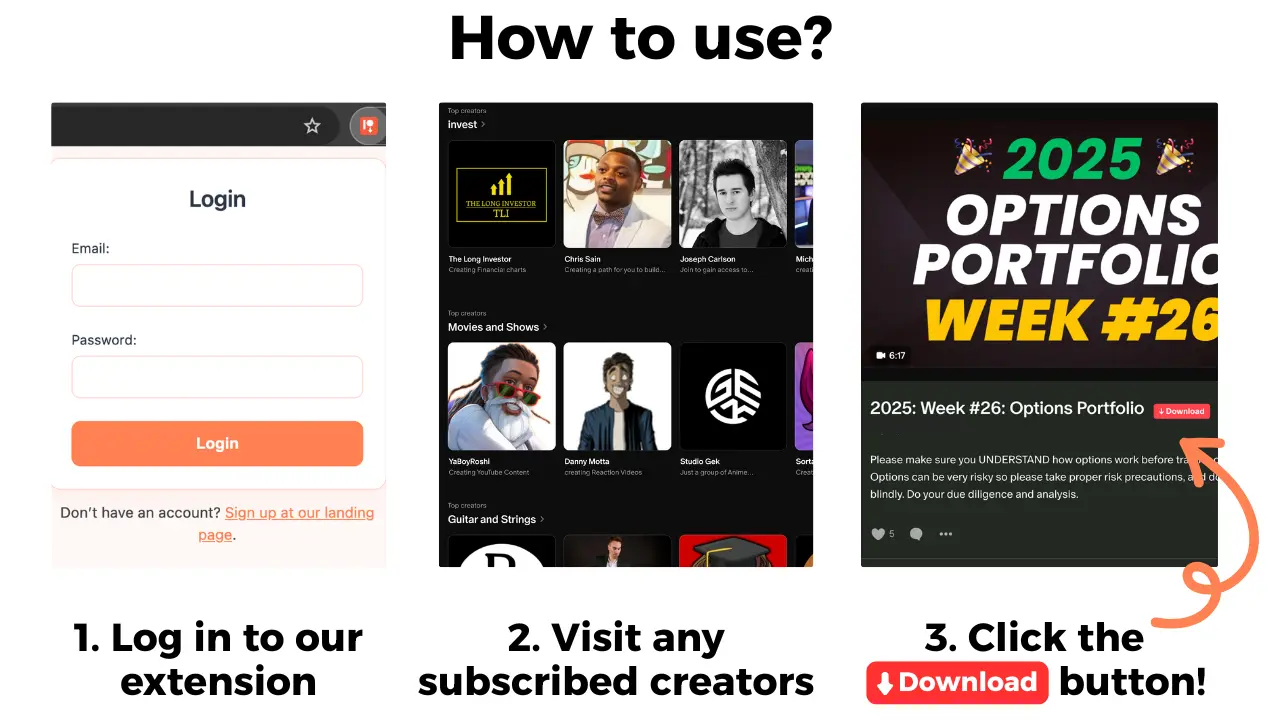
For an actual local file, Patreon Media Downloader is a Chrome extension that displays a red download button on a Patreon post you can already access. It saves supported video as MP4 for 5 credits and supported audio as MP3 for 3 credits. The 7-day trial includes 15 credits, after which the Standard plan begins unless you cancel. This does not make an unavailable post accessible or turn an unsupported media type into a downloadable file.
The extension does not download images, locked posts, file attachments, Patreon shop products, or embedded YouTube videos. If an image is available for normal browser saving, the browser's Save Image As command is a different route. An embedded player's limitations cannot be solved by changing Chrome's download directory. If you need your verified files on a phone, use the Patreon file transfer to phone guide; transferring a file is separate from locating it.
A disappearing download might also reflect a file being moved, renamed, removed by cleanup software, or saved in a different browser profile. Check the actual destination and local trash or recycle bin before assuming the creator deleted the content. Avoid installing unknown recovery tools or entering your Patreon password into third-party websites just to search for a missing filename.
A repeatable six-step filing routine
- Open desktop Chrome's Downloads list immediately after saving a supported Patreon post. Confirm the item says it finished; do not use a failed entry as evidence of success.
- Select the entry's folder action and note the full destination on your computer. If you changed the download location, check Chrome Settings instead of guessing.
- Inspect the extension and test playback. An MP4 should contain the expected video; an MP3 should contain the expected audio. A renamed web page is not equivalent.
- Create a private creator folder and, when useful, a month or series subfolder. Record a clear filename, such as the episode title and publishing month.
- Move the working file without changing its real format. Play it again from the new directory and update any personal playlist pointing at the old path.
- Make a permitted private backup, verify the backup copy, and review access rights and sharing settings. Keep files organized without assuming you own redistribution rights.
The short version
For normal Chrome downloads, start in Chrome's Downloads list and reveal the completed MP4 or MP3 in its folder. Organize only files you legitimately obtained, keep extensions intact, and test any moved or backed-up copy. Patreon app offline items and unsupported media need their own workflows; moving a folder does not change what your membership or the extension can access.