Download All Patreon Posts? Bulk and ZIP Limits (2026)
Can you download all Patreon posts or make a ZIP archive? Learn what bulk saving does not promise, how to organize permitted MP4 and MP3 files, and what to check.
If you want to download all Patreon posts in one click, first check what “all” includes. Patreon Media Downloader is documented as a Chrome extension that saves supported video as MP4 and audio as MP3 from posts you can already open. Its verified feature list does not promise bulk download, automatic creator archives, or ZIP output. You can still organize individual files you are permitted to keep and make your own ZIP on your computer. Find the original lesson first with the old Patreon posts search guide.
This guide distinguishes a post list, a media download, and a ZIP archive, then offers a practical workflow without assuming that every Patreon item is downloadable.
Can you download an entire Patreon creator page?
A creator page is not one uniform folder. It can contain accessible and locked posts, videos, audio, images, text, shop products, file attachments, and players hosted elsewhere. A request to “download everything” therefore mixes several different tasks. Even if you have paid for one membership tier, you may not have access to every post, and access does not automatically grant redistribution rights.
The verified Patreon Media Downloader workflow is deliberately narrower: open a supported post in desktop Chrome, find the red download button, and save video as MP4 or audio as MP3. It cannot unlock posts you cannot open, and it does not save images, shop products, attachments, or embedded YouTube videos. No verified product specification promises a button that exports every post in a creator's history.
Patreon's own post browsing guidance describes finding posts by media type and membership access. Use that to identify the few items you actually need rather than treating the whole page as a single downloadable archive.
Bulk download, individual files, and ZIP are different things
The words sound interchangeable, but they describe separate actions. Bulk downloading means requesting multiple media files in a single operation. An individual download saves one supported file. ZIP packaging compresses or groups files that are already on your device; it does not obtain anything from Patreon by itself.
| Goal | What to do | Important limit |
|---|---|---|
| Save a supported video | Open its accessible post in Chrome and use the red button | MP4, 5 credits per file |
| Save supported audio | Open its accessible post and use the red button | MP3, 3 credits per file |
| Save a visible image | Use the browser's Save Image As command | Not a feature of this extension |
| Get a creator's full archive | Ask the creator what authorized archive options exist | No universal export is promised here |
| Make a ZIP backup | Compress a folder of files you have already saved | ZIP cannot unlock or fetch posts |
| Listen to a podcast offline | Check the official app or creator-enabled private RSS | App downloads are not necessarily standalone files |
Do not confuse a browser extension's name with its capabilities. Some third-party pages advertise “bulk,” “ZIP,” or “all files,” but those labels do not establish that they support Patreon-hosted video, your membership, or a creator's permissions. Avoid sites asking for a Patreon password or session token to make an unverified promise.
Build a useful list before downloading
Start with a small inventory. On the creator's Patreon page, look for collections, search, and media filters where available. Record the title of each post you want, its date, its media type, and whether your account can open it. If a creator provides a legitimate download link or a permitted archive, consider that option before installing another tool.
Keep the list realistic. A course may have ten lessons but only six supported video posts; its worksheets may be attachments that the extension does not handle. A podcast may include audio posts plus private RSS episodes; a feed is not the same as a folder of MP3 files. For that distinction, read the Patreon podcast offline guide.
A simple note can use columns for post title, media type, access checked, permission checked, and file verified. This helps you avoid paying for repeated attempts or accidentally treating a locked post as a browser problem. Keep the list private if it includes membership-only titles or links.
Save supported files one post at a time
- Open Patreon in desktop Chrome and sign in with the account that can view the post.
- Open one video or audio post from your list and verify that it is not locked.
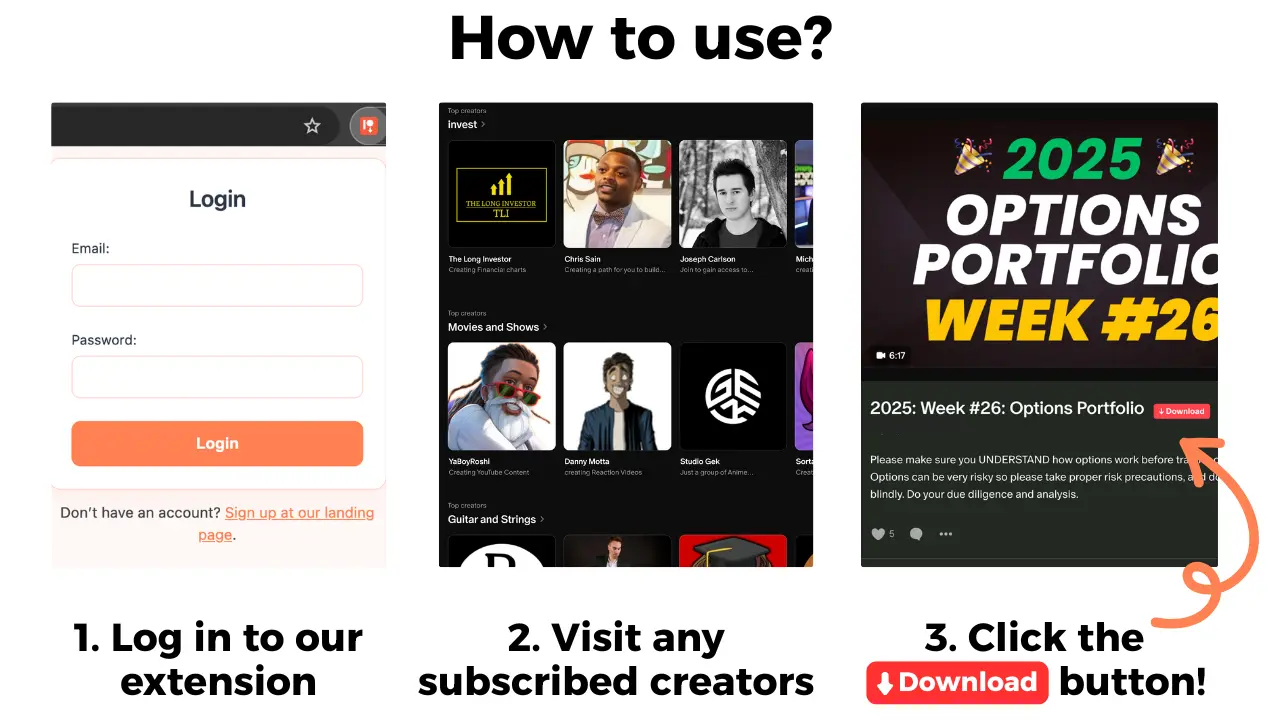
- If the media is supported, use Patreon Media Downloader's red button to save the MP4 or MP3.
- Open Chrome's downloads list, locate the completed file, and test a few seconds in a local player.
- Give the file a useful name, place it in the correct folder, and mark the post as verified on your list.
The product facts specify 5 credits for each supported video and 3 credits for each supported audio file. Two videos plus one audio use 13 credits. The trial lasts 7 days and includes 15 free credits without upfront payment; if you do not cancel, the account becomes Standard at $29.90 per month with 100 credits. Pro is $39.90 per month with 150 credits. These are extension credits, not a way to obtain a different Patreon membership tier.
If the red button is absent, check the actual post type and access before retrying. The video download troubleshooting checklist explains why locked posts, embedded YouTube players, and unsupported attachments behave differently. The general Patreon downloader guide covers the normal MP4 and MP3 workflow.
Make your own ZIP without assuming a ZIP download feature
After verifying the files, create a folder named for the creator and add subfolders for a course, month, or series. Keep original extensions such as .mp4 and .mp3; changing the filename extension does not convert the media. Avoid putting private RSS URLs, login details, or other credentials into your archive.
On Windows, select the folder and use the operating system's compression option to create a ZIP. On macOS, use Finder's Compress command. On other systems, use a trusted local archive tool. The ZIP contains only the files you placed inside it; it will not collect missing Patreon posts. Open the resulting archive and check a sample file before deleting any originals.
For phone playback, you may not need ZIP at all. Transferring a few completed MP4 or MP3 files directly is often simpler, and a phone needs a suitable app to extract an archive. The iPhone and Android transfer guide explains how to check that media is actually stored offline rather than merely linked in cloud storage.
Limits, permissions, and costly mistakes
Locked or expired access. A ZIP does not restore a membership or grant access to a post you cannot open. If you plan to cancel, check the creator's billing model and access deadline using the membership cancellation checklist. Do not assume your right to retain or redistribute content continues indefinitely.
Images, attachments, and shop items. The extension does not download these. A visible image may be saved with the browser's own command; an attachment or purchase requires the creator's delivery method. Patreon's audio post guidance also explains that creators can attach files separately from audio players, so do not mistake an attachment for a supported MP3 post.
Failed files and repeated clicks. Confirm completion in Chrome's download history before trying again. The verified product facts do not specify whether failed attempts consume credits or qualify for refunds, so do not promise a free retry. A local MP4 that fails to play is a different issue from a missing red button.
Rights and storage. Only keep copies where the creator's terms and applicable rules allow it. A ZIP makes copying easier but does not change licensing. Store permitted personal copies securely and never publish a private membership archive.
The short version
There is no verified one-click “download every Patreon post as ZIP” capability in the documented Patreon Media Downloader features. Choose accessible, supported MP4 or MP3 posts individually, confirm each file, and make your own ZIP from permitted local copies if you need an archive. For unsupported posts or a full creator collection, ask the creator for an authorized delivery option.