Patreon Converter or MP4 Downloader? What You Actually Need
Need a Patreon video as MP4? Learn when to download an accessible post, when a real file converter helps, and which locked or embedded media cannot be saved.
A Patreon converter is not the same thing as a Patreon downloader. If you want an MP4 from a video post you can already view, you usually need to save the video, not turn the post URL into another format. Patreon Media Downloader is a Chrome extension that saves supported videos as MP4 and supported audio as MP3; it is not a general-purpose converter and cannot open locked posts.
The distinction prevents two common mistakes: pasting a private Patreon page into a random conversion website, and trying to convert a file that was never downloaded in the first place.
First identify what you actually have
A Patreon post URL points to a page that may contain text, video, audio, files, or a player embedded from another service. It is not itself a video file. A website that accepts a link cannot assume it has your membership access, and changing the URL's ending will not make it an MP4.
A saved MP4 is different. It is a local media file with a container that can hold video and audio streams. The codec used inside that container also matters: MDN explains that an MP4 container can carry different codecs. A file named lesson.mp4 can therefore play in one application yet fail in another.
Think of the workflow in three stages: access a post, download permitted media, then convert a local file only if the receiving device or editor needs another encoding. Skipping the first two stages does not create usable video.
| Situation | Best next step |
|---|---|
| Accessible post URL | Check permitted video download |
| Locked post | Restore membership access |
| Saved MP4 | Test playback first |
| Local file rejected | Inspect codecs; convert a copy |
| Embedded player | Use creator-approved options |
| Image or attachment | Use permitted save method |
| These are different jobs even when a search engine calls all of them “Patreon to MP4.” |
When an MP4 download is the right answer
Start on Patreon itself. Sign in to the account that can open the post and check whether the creator has supplied a direct permitted file link. For videos hosted within Patreon, available viewing and saving controls may vary with the post and product surface. The Patreon Video overview also notes that creators can embed media hosted elsewhere, which changes what an outside downloader can access.
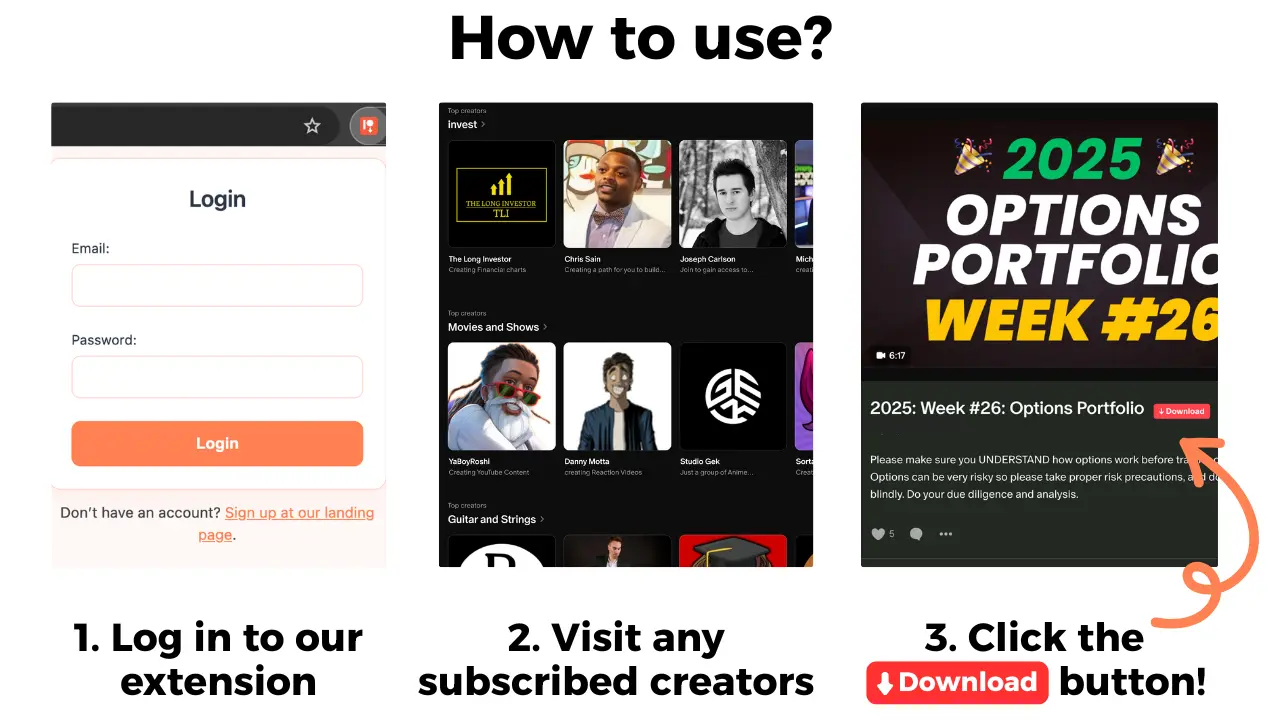
For supported posts, the documented Patreon Media Downloader workflow is straightforward:
- Install Patreon Media Downloader from the Chrome Web Store in desktop Chrome.
- Open Patreon in that Chrome profile and sign in normally.
- Open a video post that your account already has permission to view.
- Find the extension's red download button on the post.
- Save the supported video as MP4, then verify that the file finishes downloading.
- Open the saved file from your computer's Downloads folder.
The extension also saves supported audio as MP3, but an MP3 is audio only. Do not pick an audio file when you actually need the image and sound of a video. For ordinary installation and account questions, see the Patreon downloader setup guide.
When a separate converter makes sense
Conversion starts after you have a file. For example, you may have a personal copy of a video that plays on your computer but is rejected by an older television or editing application. A real converter can re-encode a permitted file into a codec profile that the destination supports; it cannot manufacture access to a Patreon membership.
Before converting, try the least destructive checks. Confirm the download is complete. Open the file in another reputable media player. Check whether the issue is a missing codec, a damaged transfer, or an unsupported editing import. If the video plays normally and your destination accepts it, you gain nothing by converting it again.
If a conversion is genuinely necessary, work on a copy of the original and retain the original until the result has been tested. Choose a trusted local application rather than uploading a private creator video to an unknown website. Media files can contain information you do not want to share with a third party, and a conversion may reduce quality or increase the file size.
Do not simply rename .webm, .mov, or .html to .mp4. A filename extension is not a transcoding process. A saved HTML page is especially important to recognize: it may contain the post's page markup, not playable video. MDN's guide to video processing explains why containers, codecs, and encoding are separate concepts.
Why Patreon-to-MP4 sites often disappoint
Many pages advertise a “Patreon link converter” as though a private page could be transformed into a file by pasting its URL. That description omits essential questions: who can access the post, where the video is actually hosted, and whether you are allowed to retain a copy. A page can be viewable to your signed-in browser while unavailable to an unrelated website.
Do not type your Patreon password into an unfamiliar converter, and do not assume a site is legitimate merely because it accepts a URL. If a service promises to open locked tiers for free, that is not a feature of Patreon Media Downloader. Its documented scope is video and audio on posts that your own account can already open.
Other limits matter too. Patreon Media Downloader does not save embedded YouTube videos, images, file attachments, or Patreon shop products. For an ordinary accessible image, your browser's Save Image As command may be appropriate. Attachments and shop items require their own authorized delivery methods. For a post with a missing button or an MP4 that stops playing, the video download troubleshooting guide addresses those symptoms directly.
A video embedded from a third-party platform is not automatically equivalent to a Patreon-hosted video. If the creator provides another approved download route, use that; otherwise, ask the creator what personal offline use they permit.
Compare the real costs and limitations
Patreon Media Downloader uses credits for supported downloads. A video MP4 costs 5 credits and an audio MP3 costs 3 credits. The 7-day trial includes 15 credits, enough for up to three videos or five audio files, with no upfront payment. After the trial, the account moves to the Standard plan unless you cancel.
| Option | Cost and principal limit |
|---|---|
| Creator-provided file | Creator terms apply |
| Chrome trial | 15 credits for 7 days; supported files only |
| Standard | $29.90/month, 100 credits; no conversion |
| Pro | $39.90/month, 150 credits; no unlocked tiers |
| Separate converter | Software-dependent; needs a local file |
| Standard provides 100 credits, enough for 20 videos or 33 audio files; Pro provides 150 credits, enough for 30 videos or 50 audio files. These are extension credits, separate from any Patreon membership payment. Paying for a different extension plan does not grant access to a creator's locked work. |
If you are preparing to watch a file on a phone, the guide to moving saved Patreon media to a phone covers transfer and offline checks without pretending that the Patreon app's offline cache is a portable MP4.
The short version
Use a downloader when you have permission to open a Patreon post and need a supported local MP4 or MP3. Use a converter only when you already have an authorized file and the next device or application requires a different encoding. A private post link, a locked tier, and an unsupported embedded player cannot be repaired simply by labeling them “MP4.”