Patreon Creator Paused Billing? Check Access and Renewal (2026)
Understand a Patreon creator's billing pause, check your access and renewal details, and distinguish regular pauses, extended pauses and Apple purchases.
If a Patreon creator pauses billing, existing members generally keep access to their included paid posts while renewals are paused. The page can remain available, and a new member may still be charged when joining. Check the pause type, your membership status and purchase channel before assuming that the break cancels your subscription or moves your renewal date.
This guide gives you a member-side checklist, including the differences that matter for extended pauses, annual memberships and Apple purchases.
Identify what was actually paused
A creator announcing a holiday is not enough to establish a billing change. Read the announcement for a billing pause, its scope and any intended return date. Then compare that message with the membership information in your account.
| Situation | What to establish | Next check |
|---|---|---|
| Standard creator billing pause | Creator has paused a normal cycle | Membership status and next charge |
| Eligible extended creator pause | A longer or open-ended pause applies | Announced terms and checkout details |
| Gift applied to your membership | Gift time is covering your account | Gift end date and existing paid term |
| Your membership was canceled | Your own renewal was ended | Access end date in membership details |
| A post is locked | Access is not available for that item | Account, tier and payment status |
A gift membership has its own timeline. It is not a creator-wide billing pause. If you deliberately want to end your membership, use the cancellation preparation guide, then verify the current account details before acting.
Patreon's standard pause documentation describes a one-month pause that ordinarily resumes automatically. Eligible creators migrating from per-creation billing have extended pause options, including a selected end date or no end date. Do not apply the standard one-month expectation to every pause.
Check your own membership before changing anything
- Read the creator's pause announcement and keep its date.
- Open the correct Patreon account's Memberships settings and the creator's details.
- Record membership status, tier, next charge and the purchase channel.
- Compare billing history with one post your tier includes.
- Write down any difference between the notice, account details and actual access.
The aim is to understand the current state, not to trigger another payment as a test. Do not cancel, rejoin or upgrade simply because the expected charge is absent. Those are separate membership decisions, and they can make the original situation harder to diagnose.
Use a short private record: “notice says billing paused; membership still active; lesson opens; next charge needs confirmation.” This separates four observations instead of reducing everything to “Patreon is broken.” You can update the uncertain item after receiving an answer.
If you support several creators, review each membership separately. A notice from one creator does not describe your entire learning budget. Match the creator name in the notice to the account entry rather than assuming every recent charge belongs to the same subscription.
Read joining, annual and Apple details separately
For a standard subscription-billing pause, joining can still involve an upfront payment. A skipped renewal for an existing member does not mean a free signup offer. Inspect the checkout summary before confirming anything, especially if you are returning with a different account.
Eligible extended pauses can let new web members pay on joining or wait until billing resumes. Apple's in-app purchases can still charge at signup. Annual treatment also differs: the standard guide leaves the annual renewal unchanged, whereas the extended guide describes an adjusted renewal when an annual term is affected.
Apple purchases have another extended-pause limit: Patreon documents two paused cycles per year, after which Apple can cancel the membership. Check your actual status if an extended break affects an Apple subscription; do not assume paid access will restart automatically.
Keep the exact displayed date in your record. Do not calculate a replacement date by adding a month to an old screenshot. A creator's return date and your own next charge are different pieces of information. Patreon's member billing explanation is a useful reference when the account schedule needs clarification.
Diagnose a locked post as its own problem
A billing pause does not establish that every post is included in your tier. Patreon's post access checklist recommends checking the applicable tier and payment status. Confirm that you are signed into the membership account before retrying.
Choose one known lesson rather than opening many random links. Record its title, URL, the tier you hold and the message shown. If some included posts open and one does not, that distinction is useful to the creator. It is more precise than saying the whole archive disappeared.
If the item should be included, ask about that item through the creator's established support route. Include the pause notice date and your observations, but exclude passwords, login codes and full payment details. A missing payment, a declined payment and a confirmed pause should not be described as the same event.
Keep your learning plan usable during the break
A pause can be a chance to organize lessons you already have permission to use. Build a private list of post links, completed lessons and questions for later. The old-post search guide helps with locating material; it does not determine billing or access.
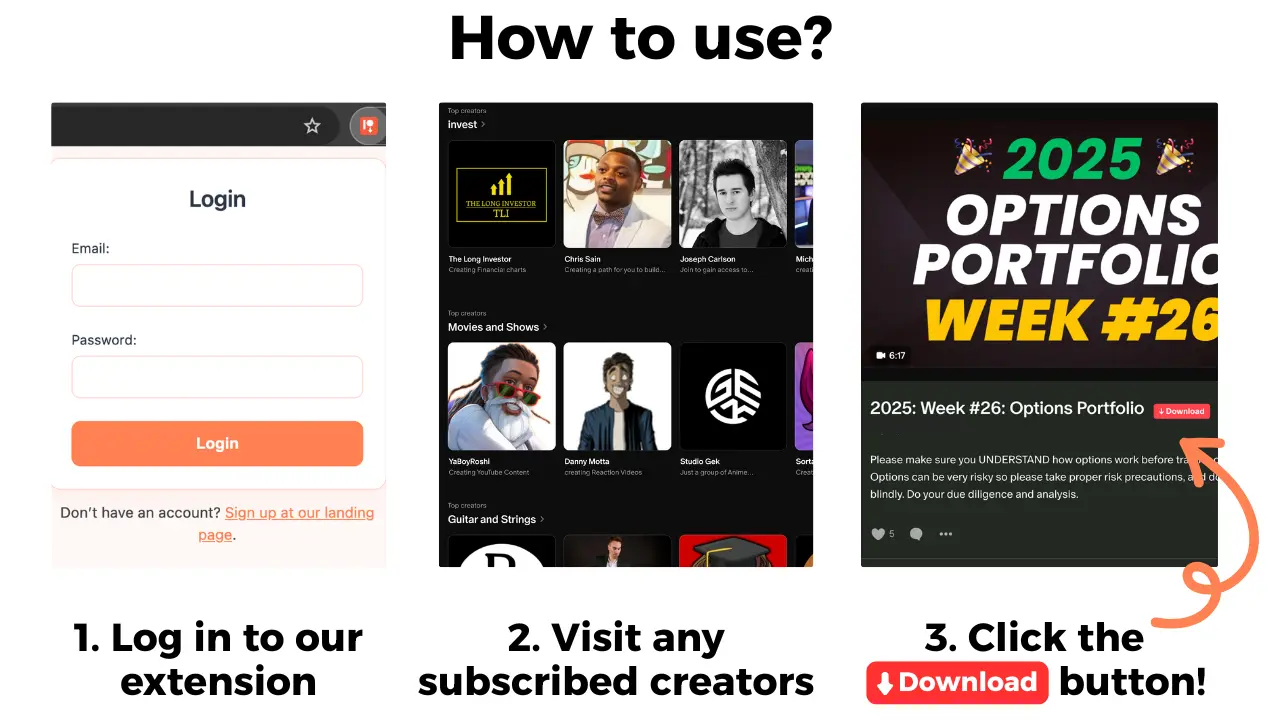
For permitted offline study, Patreon Media Downloader saves supported accessible video posts as MP4 and audio posts as MP3 in Chrome. It does not change membership status, repair billing or open locked posts. Check access and the creator's permission before saving.
Keep a saved file's creator and lesson title alongside your notes. Test that the file opens before relying on it during travel. This is personal organization, not a promise that the extension preserves community features or future access.
A private study list should not contain shared login details or other members' comments. If the creator changes the return plan, update the date and keep your unresolved billing question visible rather than treating an offline file as proof that the membership is settled.
Common questions
Does a creator's billing pause mean my membership was canceled?
No. A creator billing pause and a canceled membership are different states. Check your own membership details rather than inferring cancellation from a missing payment.
Can joining a paused creator still cost money?
Yes. Standard pauses can still charge new members upfront. Eligible extended pauses offer different web signup options; inspect checkout and the purchase channel.
Does every pause move an annual renewal date?
No. Patreon's standard and extended pause documentation describe different annual treatment. Confirm the applicable pause and your displayed renewal date.
Can the downloader restore access during a pause?
No. It saves supported video as MP4 and audio as MP3 from posts you can already open. It cannot change billing or restore locked content.
The short version
Check which pause applies, then compare your own membership status, billing record and one included post. Treat joining payments, annual dates and Apple purchases separately, and ask a precise question wherever the notice and your account do not match.